Comparison of Agentic Frameworks
Scratching the surfaces of agentic frameworks i.e LangGraph, LlamaIndex, CrewAI and Strands
- published
- reading time
- 21 minutes
Purpose
The purpose of this document is to evaluate and compare leading AI agentic frameworks. This document aims to assess each framework based on technical capabilities, developer experience, integration flexibility, scalability and maturity.
Framework Selection Criteria
Evaluation Dimensions
- Primary Focus:
- Core use case of the framework
- Developer Experience:
- Learning curve
- Ease of implementation
- Integration Capabilities:
- Tool ecosystem: Number of pre built implementations of tools
- Extensibility: Ease of extending the code available by the library
- Community & Support:
- Ecosystem maturity: Number of GitHub Stars, Last version update
- Documentation quality: Documentation with good examples, Availability of video tutorials
Why do we need Agentic Frameworks?
To address this question, it’s important to first distinguish between Large Language Models (LLMs) and AI agents.
Large Language Models (LLMs) are AI models trained on vast amounts of text data to understand, generate, and manipulate human language. They excel in tasks that require understanding the context of text, predicting what comes next, and generating coherent responses.
AI agents, in contrast to LLMs, are purpose-built for real-world interaction. These agents possess the ability to perceive their environment, make decisions, and execute actions autonomously or semi-autonomously. Whether it’s scheduling appointments, managing smart home devices, or providing customer support, AI agents are designed to perform tasks and take actions based on the information they gather.
This leads to the key question: How do we build such AI agents?
To answer that, we turn to agentic frameworks—structured platforms that enable developers to orchestrate perception, reasoning, decision-making, and action execution in a cohesive and maintainable way.
Single Agent
When we equip a Large Language Model (LLM) with the ability to reason, decide, and act, we effectively create a ReAct (Reason + Act) agent. However, implementing such capabilities from scratch can be complex, time-consuming, and error-prone.
This is where Agentic Frameworks become valuable—they provide pre-built abstractions and interfaces that simplify the development of intelligent agents.
For example, the Strands framework offers a ready-to-use Agent implementation. Developers can directly specify the foundational model (e.g., an LLM) and a set of tools (APIs or functions that allow the agent to interact with the environment). The framework then handles the orchestration of the reasoning loop—what it refers to as the Agent Loop.
Other Agentic Frameworks follow similar patterns, abstracting away the complexities of reasoning and decision-making, thereby enabling developers to focus on the core logic of their application or domain.
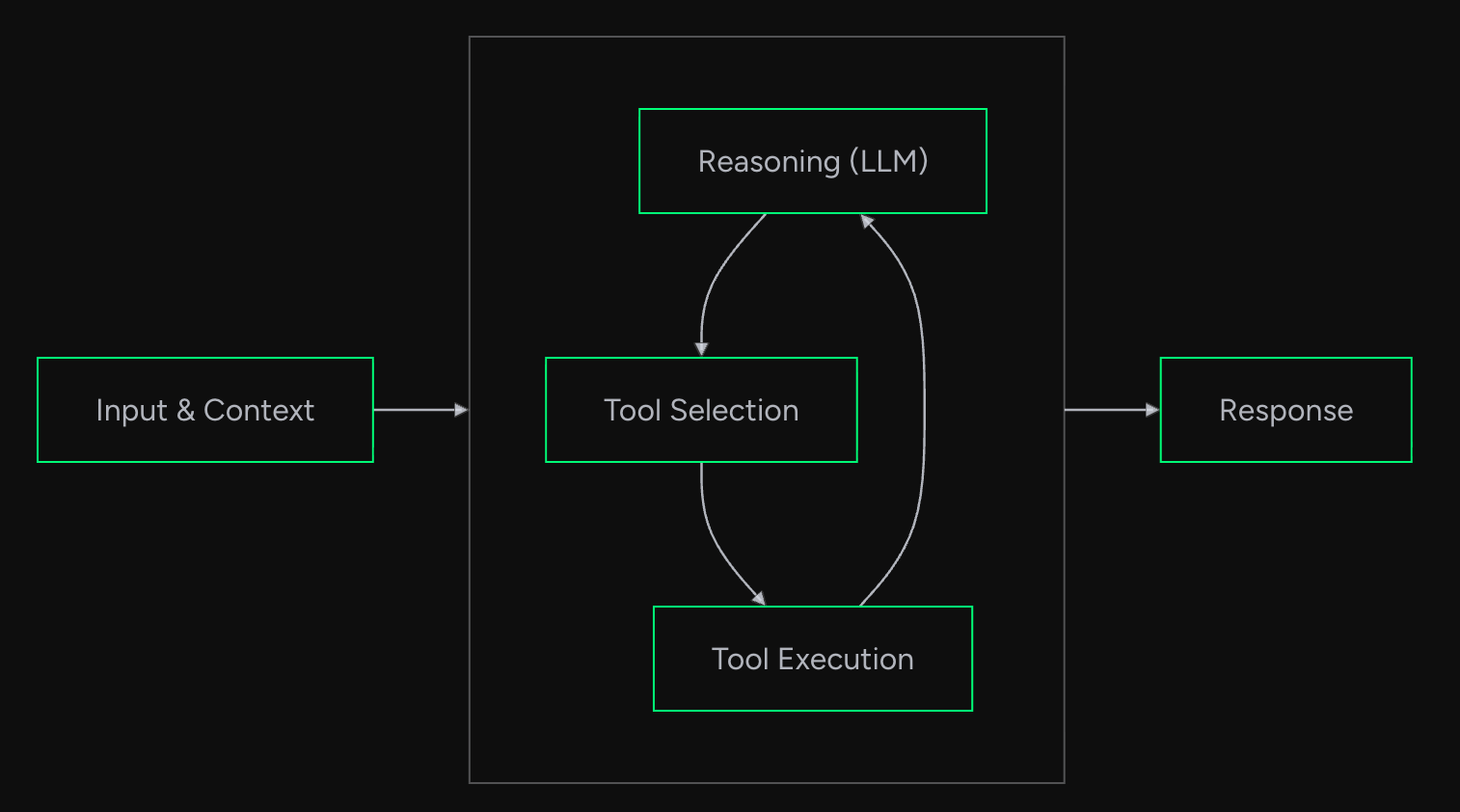
Agent Loop in Strands
Multi Agents
A single agent often lacks the breadth of expertise and capability required to solve complex, multi-faceted problems. In scenarios where diverse skills and perspectives are essential—such as autonomous software delivery—multiple specialized agents must collaborate. For example:
- A Backend Agent handles API and service logic.
- A Frontend Agent manages user interface components.
- A QA Agent ensures functionality and reliability through testing.
- A DevOps Agent oversees deployment and infrastructure.
Together, these agents form a cohesive system capable of autonomously shipping production-ready code.
To enable such collaboration, agents must be able to communicate, delegate, and transfer control or information—a process known as handoff. This is where Agentic Frameworks play a critical role: they simplify the design, coordination, and execution of multi-agent workflows.
Common architectural patterns for multi-agent systems include:
- Swarm – Agents operate independently but coordinate based on shared goals or environmental signals.
- Orchestrator – A central agent manages task distribution and decision-making across agents.
- Hierarchical – Agents are structured in a parent-child relationship, enabling layered task delegation. Modern Agentic Frameworks support these patterns and provide the infrastructure needed to build scalable, collaborative agent systems that can tackle real-world complexity.
Summarizing what Agentic Frameworks do
At their core, agentic frameworks help you with prompt engineering and routing data to and from the LLMs— but they also offer additional abstractions that make it easier to get started.
If you were to build a system from scratch where an LLM should use different APIs — tools — you’d define that in the system prompt. Then you’d request that the LLM returns its response along with the tool it wants to call, so the system can parse and execute the API call.
When we set up knowledge base, a framework might allow for always including it. This gets added to the prompt as context, similar to how we build standard RAG systems.
A framework can also help with things like error handling, structured outputs, validation, observability, deployment — and generally help you organize your code so you can build more complex systems, like multi-agent setups.
Considerations
There are a large number of Agentic Frameworks available and its not feasible to evaluate all, so we will consider only the ones which are somewhat popular.
| Framework | GitHub Link | GitHub Stars | License | Documentation | |
|---|---|---|---|---|---|
| 1 | Strands | GitHub - strands-agents | 2k+ | Apache 2.0 | Strands Agents |
| 2 | LangGraph | GitHub - langchain-ai/langgraph | 16k+ | MIT | LangGraph |
| 3 | LlamaIndex | GitHub - run-llama/llama_index | 43k+ | MIT | LlamaIndex |
| 4 | CrewAI | GitHub - crewAIInc/crewAI | 35k+ | MIT | CrewAI |
Framework Analysis
Strands
Strands Agents is a simple yet powerful SDK that takes a model-driven approach to building and running AI agent.
Creating an Agent
from strands import Agent
from strands.models.bedrock import BedrockModel
from strands_tools import calculator

agent = Agent(system_prompt="You are a math agent", tools=[calculator])

message = "Calculate 125/5"
print(agent(message))

"""
I'll calculate 125/5 for you.

Tool #1: calculator

The result of 125/5 is **25**.The result of 125/5 is **25**.

"""
Timed: 0.37s user 0.16s system 6% cpu 7.893 total
Pros
- Model Agnostic: Support for Amazon Bedrock, Anthropic, LiteLLM, Llama, Ollama, OpenAI, Writer, and custom providers. We can switch to different LLM models without code changes.
- Lightweight and Flexible: It provides us with a single Agent interface (
from strands import Agent) which implements the Agent Loop and is extensible - Best in class AWS integration: Easily deploys to EKS, Fargate, Lambda, EC2 and is also supported by Bedrock AgentCore
- Built-in tools: A large number of built-in tools available via
strands-agents-tools - Built-in Multi Agent patterns: Agents as tools (Orchestrator), Swarm, Graph (DAG), Workflow (Chain)
Cons
- State management in a multi agent system is not straightforward as state is only maintained per agent level and there is no concept of shared state
- There is no support for cyclic multi agent system as of now but is WIP PR
- Limitation of only adding an Agent interface as Node with the Graphs but it can be resolved by adding boilerplate code and have custom logic as Node within the graphs
LangGraph
LangGraph is a framework built upon the LangChain library and uses its many functions and tools. LangGraph utilizes graphs to create a multi-agent or single agent structure. It gives you stricter engineering control over workflows and doesn’t assume agents should have much agency.
Creating an Agent
Note: Docstrings are required for tools.
from langgraph.prebuilt import create_react_agent
from langchain_aws import ChatBedrockConverse
from langchain_core.messages import HumanMessage
from langchain_core.tools import tool
import asyncio

@tool
def calculator(expression: str) -> str:
    """Evaluates a mathematical expression and returns the result.

    This tool takes a string containing a mathematical expression, evaluates it
    using Python's eval() function, and returns the result. It handles basic
    arithmetic operations, mathematical functions, and can work with complex
    expressions.

    Args:
        expression (str): A string containing a mathematical expression to evaluate,
                          such as "2 + 2", "5 * (3 + 2)", or "math.sin(0.5)".

    Returns:
        str: A string containing the result of the evaluation prefixed with "Result: ",
             or an error message if the evaluation fails.

    Raises:
        Exception: The function catches all exceptions during evaluation and returns
                   them as error messages in the returned string.

    Examples:
        >>> calculator("2 + 2")
        "Result: 4"
        >>> calculator("5 * (3 + 2)")
        "Result: 25"
        >>> calculator("10/0")
        "Error calculating expression: division by zero"
    """
    try:
        result = eval(expression)
        return f"Result: {result}"
    except Exception as e:
        return f"Error calculating expression: {str(e)}"

llm = ChatBedrockConverse(
    model_id="us.anthropic.claude-3-7-sonnet-20250219-v1:0",
    region_name="us-east-1",
)
agent = create_react_agent(llm, tools=[calculator], prompt="You are a math agent")

async def run_agent(message: str):
    result = await agent.ainvoke({"messages": [HumanMessage(content=message)]})
    return result

if __name__ == "__main__":
    message = "Calculate 125/5"
    result = asyncio.run(run_agent(message))
    print(result)
Timed: 0.40s user 0.14s system 11% cpu 4.727 total
Pros
- Comprehensive memory: Create truly stateful agents with both short-term working memory for ongoing reasoning and long-term persistent memory across sessions.
- Human-in-the-loop: Seamlessly incorporate human oversight by inspecting and modifying agent state at any point during execution.
- Compatible for Complex Orchestration: It uses a graph-based approach where you build nodes and connect them via agents. This does not pose any limitation on the type of workflow we want to design be it loops, branches etc.
- Shared State: In case of multi agent systems there is a shared state which is accessible at each node in the graph and makes it easier to manage.
Cons
- Complex deployment: It lacks polish for large scale uses. It supports 3 types of deployment options. Here is a quick comparison. Both the options where the data and compute is required in our cloud we need to purchase the enterprise solution. Otherwise we will have to build our own solution.
| Cloud | Hybrid | Self-Hosted | ||
|---|---|---|---|---|
| 1 | Description | All components run in LangChain’s cloud | Control plane runs in LangChain’s cloud; data plane in your cloud | All components run in your cloud |
| 2 | CI/CD | Managed internally by platform | Managed externally by you | Managed externally by you |
| 3 | Data/compute residency | LangChain’s cloud | Your cloud | Your cloud |
| 4 | LangSmith compatibility | Trace to LangSmith SaaS | Trace to LangSmith SaaS | Trace to Self-Hosted LangSmith |
| 5 | Pricing | Plus | Enterprise | Enterprise |
- Learning Curve: Requires familiarity with both LangChain and graph structures and is very low level framework.
LlamaIndex
LlamaIndex (GPT Index) is a data framework for your LLM application. Building with LlamaIndex typically involves working with LlamaIndex core and a chosen set of integrations (or plugins).
Creating an Agent
from llama_index.core.agent.workflow import ReActAgent
from llama_index.llms.bedrock_converse import BedrockConverse
import asyncio

def calculator(expression: str) -> str:
    """Evaluates a mathematical expression and returns the result.

    This tool takes a string containing a mathematical expression, evaluates it
    using Python's eval() function, and returns the result. It handles basic
    arithmetic operations, mathematical functions, and can work with complex
    expressions.

    Args:
        expression (str): A string containing a mathematical expression to evaluate,
                          such as "2 + 2", "5 * (3 + 2)", or "math.sin(0.5)".

    Returns:
        str: A string containing the result of the evaluation.
    """
    try:
        result = eval(expression)
        return f"Result: {result}"
    except Exception as e:
        return f"Error calculating expression: {str(e)}"

llm = BedrockConverse(
    model="us.anthropic.claude-3-7-sonnet-20250219-v1:0",
)

agent = ReActAgent(
    name="math_agent",
    system_prompt="You are a math agent that can solve mathematical problems. Use the calculator tool to evaluate expressions.",
    tools=[calculator],
    llm=llm,
)

async def run_agent(message: str):
    """Run the agent with a given message.

    Args:
        message (str): The user's message to the agent

    Returns:
        The agent's response
    """
    response = await agent.run(message)
    return response

if __name__ == "__main__":
    message = "Calculate 125/5"
    result = asyncio.run(run_agent(message))
    print(result)
    print(result.tool_calls)

 """
 The result of 125 divided by 5 is 25.
[ToolCallResult(tool_name='calculator', tool_kwargs={'expression': '125/5'}, tool_id='16d0b75c-0a68-4f2e-a219-1165fc4ee2e8', tool_output=ToolOutput(blocks=[TextBlock(block_type='text', text='Result: 25.0')], tool_name='calculator', raw_input={'args': (), 'kwargs': {'expression': '125/5'}}, raw_output='Result: 25.0', is_error=False), return_direct=False)]
 """
Timed: 0.90s user 0.32s system 17% cpu 7.001 total
Pros
- Data Framework: It powers agentic document workflows. It use-cases revolve around extensive data lookup, retrieval, and knowledge fusion. LlamaIndex is the framework for Context-Augmented LLM Applications.
- Data connectors: Ingest your existing data from their native source and format. These could be APIs, PDFs, SQL, and (much) more.
- Rich Community: It has a rich document and a huge number of video tutorials present to get started with
Cons
- Deployment of the agent requires understanding the
llama-deploylibrary. Where we will have to develop our own control plane, queues and service. Reference https://docs.llamaindex.ai/en/stable/module_guides/llama_deploy/10_getting_started/
CrewAI
CrewAI is a lean, lightning-fast Python framework built entirely from scratch—completely independent of LangChain or other agent frameworks. It revolves around these paradigm:
- CrewAI Crews: Optimize for autonomy and collaborative intelligence. Crews consists of Agents and Tasks which can be defined in code or in a YAML file.
- CrewAI Flows: Enable granular, event-driven control, single LLM calls for precise task orchestration and supports Crews natively
Creating an Agent
from typing import Type

from crewai import Agent, Task, Crew, Process, LLM
from crewai.tools import BaseTool
from pydantic import BaseModel, Field

class CalculatorInput(BaseModel):
    expression: str = Field(..., description="The mathematical expression to evaluate.")

class CalculatorTool(BaseTool):
    name: str = "Calculator Tool"
    description: str = "Evaluates a mathematical expression and returns the result."
    args_schema: Type[BaseModel] = CalculatorInput

    def _run(self, expression: str) -> str:
        try:
            result = eval(expression)
            return f"Result: {result}"
        except Exception as e:
            return f"Error calculating expression: {str(e)}"

def create_math_agent():

    llm = LLM(
        model="us.anthropic.claude-3-7-sonnet-20250219-v1:0",
        aws_region_name="us-east-1",
    )

    math_agent = Agent(
        role="A skilled mathematician who can solve mathematical problems.",
        goal="Solve mathematical problems accurately and efficiently.",
        backstory="You are an expert mathematician with years of experience solving complex mathematical problems.",
        verbose=True,
        allow_delegation=False,
        tools=[CalculatorTool()],
        llm=llm,
    )

    return math_agent

def run_agent(message: str):
    math_agent = create_math_agent()

    task = Task(
        description=message,
        agent=math_agent,
        expected_output="The solution to the mathematical problem.",
    )

    crew = Crew(
        agents=[math_agent],
        tasks=[task],
        process=Process.sequential,
        verbose=True,
    )

    result = crew.kickoff()
    return result

if __name__ == "__main__":
    message = "Calculate 125/5"
    result = run_agent(message)
    print(result)
Timed: 1.36s user 0.41s system 13% cpu 12.806 total
Pros
- Full autonomy: We can define a crew which can have agents and tasks which can work autonomously to solve a problem. Then each crew can be linked using Flows to solve more complex problems
- Extensive tools: There are extensive list of tools offered by CrewAI Toolkit and LangChain Toolkit. There are tools for interacting with files & documents, web scraping, cloud etc — see CrewAI tools overview
- Built-in Memory: It provides us with built-in short term and long term memory with ability to integrate with standalone memory providers
Cons
- Less Control: It is highly abstracted and provides us with interfaces which force us to work in the way the framework is designed and allows less modifications.
- Slow and Costly: Online analysis of this framework suggests it is quite slow and repeats redundant tasks which makes it use tokens more. It also is the slowest of all the frameworks in our comparison
- Deployment requires enterprise version of crewAI or else we will have to create our own sophisticated solution to handle the deployment
Comparison Matrix
| Evaluation Criteria | Strands | LangGraph | LlamaIndex | CrewAI | |
|---|---|---|---|---|---|
| 1 | Core use case of the framework | Model-driven approach to building and running AI agents with AWS-native integration | Orchestration of complex, stateful, graph-based multi-agent workflows with explicit branching, loops, and checkpoints | Connecting, indexing, and querying unstructured data sources via RAG; multi-agent flows as secondary capability | Role-based, sequential/hierarchical multi-agent teamwork with high-level abstractions |
| 2 | Learning curve | ⭐⭐⭐⭐⭐ Minimal - Python-native API with simple Agent interface | ⭐⭐ Steep - Requires LangChain knowledge + graph theory understanding | ⭐⭐⭐ Moderate - Good documentation and tutorials available | ⭐⭐⭐⭐ Easy - Good documentation and structured code which revolves around crews and flows |
| 3 | Ease of implementation | ⭐⭐⭐⭐⭐ Very Easy - Simple Agent interface, ~50-80 lines of code typical for a single agent | ⭐⭐ Complex - Requires complex state management, ~150-200 lines typical for a single agent | ⭐⭐⭐ Moderate - Balanced abstraction/control, ~100-150 lines typical for a single agent | ⭐⭐⭐⭐ Easy - Declarative approach, ~80-160 lines typical for a single agent |
| 4 | Tool ecosystem: Number of pre-built implementations | ⭐⭐⭐⭐ Good - strands-agent-tools library with built-in tools |
⭐⭐⭐⭐ Good - Full LangChain toolkit ecosystem | ⭐⭐⭐⭐⭐ Excellent - 160+ data connectors, extensive community tools | ⭐⭐⭐⭐⭐ Excellent - LangChain + CrewAI toolkits |
| 5 | Extensibility: Ease of extending the code available | ⭐⭐⭐⭐ Good - Lightweight and flexible, extensible Agent interface | ⭐⭐⭐⭐⭐ Excellent - Highly extensible with full control over workflow logic | ⭐⭐⭐⭐ Good - Python functions as tools, good abstraction/control balance | ⭐⭐⭐ Moderate - Framework-specific concepts, less granular control |
| 6 | AWS Integration: Ease of integrating with AWS services | ⭐⭐⭐⭐⭐ Excellent - Native support for Bedrock AgentCore, ECS, Fargate, Lambda, EC2 | ⭐⭐⭐ Good - Bedrock AgentCore compatible, requires additional setup for other services | ⭐⭐⭐ Good - Bedrock support, limited AgentCore examples, moderate AWS integration | ⭐⭐ Basic - Basic AWS support, limited native integration |
| 7 | Ecosystem maturity: GitHub Stars | 2k+ stars | 16k+ stars | 43k+ stars | 35k+ stars |
| 8 | Ecosystem maturity: Last version update | Last release: 2025/08/04 | Last release: 2025/08/03 | Last release: 2025/08/06 | Last release: 2025/07/30 |
| 9 | Documentation quality: Good examples | ⭐⭐⭐⭐ Good - AWS-focused documentation with practical examples | ⭐⭐⭐ Good - Comprehensive but complex, requires LangChain knowledge | ⭐⭐⭐⭐⭐ Excellent - Rich documentation with extensive examples | ⭐⭐⭐⭐ Good - Clear documentation with practical examples |
Implementation Analysis
To get a better picture of each framework we did an exercise of creating a simple multi agent system using each framework. The workflow of the multi agent system is defined below
Note: You can find the code for the implementation in each framework in the Appendix.
Implementation Insights
| Framework | Lines of Code | Key Characteristics | |
|---|---|---|---|
| 1 | CrewAI | ~80 (for Flow) + ~160(crew) | Declarative flows with decorators, minimal boilerplate |
| 2 | LlamaIndex | ~120 | Event-driven workflow with good abstraction and rich documentation and tutorials to navigate through |
| 3 | LangGraph | ~192 | Full control with explicit state management, but can lead to information overload while navigating through docs |
| 4 | Strands | N/A | Cannot implement cyclic workflows (limitation) |
Recommendation
Each Agentic Framework serves a distinct purpose and is best suited for specific use cases based on development goals, complexity, and deployment needs:
- Strands
Ideal for rapid agent development and seamless AWS integration. Strands abstracts away most low-level implementation details, making it easy to deploy agents across AWS services (EKS, Lambda, Fargate, EC2) without significant boilerplate or configuration overhead. - LangGraph
Recommended for use cases requiring fine-grained control over agent behavior and workflow design. While it offers a powerful and flexible graph-based execution model, it demands deeper familiarity with LangChain and involves writing more boilerplate code. Best suited for building complex autonomous workflows. - LlamaIndex
Best used when the primary focus is RAG (Retrieval-Augmented Generation) and integrating multiple data sources into agent workflows. LlamaIndex enables data-centric agents capable of performing advanced querying and contextual reasoning over dynamic knowledge bases. - CrewAI
Designed for high-level abstraction and minimal code, CrewAI is ideal for team-based agent architectures that require collaboration across roles or functions. It supports data source integration and structured task delegation. However, it is comparatively slower and incurs higher operational costs.
Appendix
References & Resources
- AWS Prescriptive Guidance: Agentic AI Frameworks
- Strands Documentation
- LangGraph Guides
- LlamaIndex Workflows
- CrewAI Concepts
Code
CrewAI
Creating Workflow
We create a flow.py which will use the created crews and connect them using flows to match the diagram
flow.py (Crews need to be created separately)
from typing import Optional

from crewai.flow.flow import Flow, listen, router, start
from pydantic import BaseModel

from self_evaluation_loop_flow.crews.shakespeare_crew.shakespeare_crew import (
    ShakespeareanXPostCrew,
)
from self_evaluation_loop_flow.crews.x_post_review_crew.x_post_review_crew import (
    XPostReviewCrew,
)
from dotenv import load_dotenv

load_dotenv()

class ShakespeareXPostFlowState(BaseModel):
    x_post: str = ""
    feedback: Optional[str] = None
    valid: bool = False
    retry_count: int = 0

class ShakespeareXPostFlow(Flow[ShakespeareXPostFlowState]):

    @start("retry")
    def generate_shakespeare_x_post(self):
        print("Generating Shakespearean X post")
        topic = "Flying cars"
        result = (
            ShakespeareanXPostCrew()
            .crew()
            .kickoff(inputs={"topic": topic, "feedback": self.state.feedback})
        )

        print("X post generated", result.raw)
        self.state.x_post = result.raw

    @router(generate_shakespeare_x_post)
    def evaluate_x_post(self):
        if self.state.retry_count > 3:
            return "max_retry_exceeded"

        result = XPostReviewCrew().crew().kickoff(inputs={"x_post": self.state.x_post})
        self.state.valid = result["valid"]
        self.state.feedback = result["feedback"]

        print("valid", self.state.valid)
        print("feedback", self.state.feedback)
        self.state.retry_count += 1

        if self.state.valid:
            return "complete"

        return "retry"

    @listen("complete")
    def save_result(self):
        print("X post is valid")
        print("X post:", self.state.x_post)

        with open("x_post.txt", "w") as file:
            file.write(self.state.x_post)

    @listen("max_retry_exceeded")
    def max_retry_exceeded_exit(self):
        print("Max retry count exceeded")
        print("X post:", self.state.x_post)
        print("Feedback:", self.state.feedback)

def kickoff():
    shakespeare_flow = ShakespeareXPostFlow()
    shakespeare_flow.kickoff()

def plot():
    shakespeare_flow = ShakespeareXPostFlow()
    shakespeare_flow.plot()

if __name__ == "__main__":
    kickoff()
LlamaIndex
Creating Workflow
from llama_index.core.workflow import (
    Event,
    StartEvent,
    StopEvent,
    Workflow,
    step,
    Context,
)

from llama_index.core.agent.workflow import ReActAgent
from llama_index.llms.bedrock_converse import BedrockConverse
from typing import Optional

from pydantic import BaseModel
import asyncio

class PostEvent(StartEvent):
    topic: str
    feedback: Optional[str] = None

class VerifyPostEvent(Event):
    post: str

class VerifyPostOutput(BaseModel):
    valid: bool
    feedback: Optional[str] = None

class Shakespeare(Workflow):

    llm = BedrockConverse(
        model="us.anthropic.claude-3-7-sonnet-20250219-v1:0",
    )

    @step
    async def generate_post(self, ctx: Context, ev: PostEvent) -> VerifyPostEvent:
        feedback = ev.feedback
        topic = ev.topic
        await ctx.store.set("topic", topic)
        retries = await ctx.store.get("retries", default=0)
        print(f"Generating Post using {topic=}, {feedback=}, {retries=}")
        system_prompt = """
Thou art a witty bard, renowned for turning the mundane into the
magnificent with thy playful jests and biting sarcasm. Armed with wit and
wisdom, thou dost revel in the creation of humorous quips most pleasing to the ear.
"""
        shakespeare_agent = ReActAgent(
            name="shakespeare_agent",
            system_prompt=system_prompt,
            llm=self.llm,
        )
        prompt = f"""
 Given the topic '{topic}', compose a humorous hot take in the style of Shakespeare.
The tone should be sarcastic and playful. The final short form social media post
must be over 200 characters and not exceed 280 characters, and emojis are strictly forbidden.

Please incorporate the following feedback if present:
{feedback}

"""
        response = await shakespeare_agent.run(user_msg=prompt)
        await ctx.store.set("retries", retries + 1)
        return VerifyPostEvent(post=str(response))

    @step
    async def verify_post(
        self, ctx: Context, ev: VerifyPostEvent
    ) -> StopEvent | PostEvent:
        post = ev.post
        retries = await ctx.store.get("retries")
        if retries > 1:
            return StopEvent(result="Failed to generate a valid post after 3 retries.")
        system_prompt = """
You are a careful reviewer, skilled at understanding the core message of a post.
Your job is to maintain the clarity and brevity of the post by ensuring it contains no emojis,
unnecessary commentary, or excessive verbosity.
"""
        print(f"Verifying Post: {post=}")
        post_verifier_agent = ReActAgent(
            name="post_verifier_agent",
            system_prompt=system_prompt,
            llm=self.llm,
            output_cls=VerifyPostOutput,
        )
        prompt = f"""
Verify that the given X post meets the following criteria:
    - It is between 200 and 280 characters inclusive.
    - It contains no emojis.
    - It contains only the post itself, without additional commentary.

    The post should follow the 1-3-1 rule:
    - 1 bold statement to hook the reader
    - 3 lines of supporting information
    - 1 sentence to summarize the post

    Additionally, if you believe there are any issues with the post
    or ways it could be improved, such as the structure of the post,
    rhythm, word choice, please provide feedback.

    If any of the criteria are not met, the post is considered invalid.
    Provide actionable changes about what is wrong and what actions
    need to be taken to fix the post.

    Your final response must include:
    - Valid: True/False
    - Feedback: Provide commentary if the post fails any of the criteria.

    X Post to Verify:
    {post}
"""
        response = await post_verifier_agent.run(user_msg=prompt)

        print(f"Response: {response.structured_response}")
        topic = await ctx.store.get("topic")
        print(f"TOPIC: {topic}")
        if response.structured_response["valid"]:
            return StopEvent(result=str(response))
        else:
            return PostEvent(
                topic=topic, feedback=response.structured_response["feedback"]
            )

async def run():
    w = Shakespeare(timeout=60, verbose=False)
    ctx = Context(w)
    result = await w.run(topic="pirates", ctx=ctx)
    print(str(result))

if __name__ == "__main__":
    asyncio.run(run())
LangGraph
from typing import TypedDict, Literal, Optional
from langgraph.graph import StateGraph, END
from langgraph.prebuilt import create_react_agent
from langchain_aws import ChatBedrockConverse
from langchain_core.messages import HumanMessage
from langchain_core.tools import tool
from pydantic import BaseModel, Field
import asyncio

class GraphState(TypedDict):
    topic: str
    post: Optional[str]
    feedback: Optional[str]
    retries: int
    valid: bool
    final_result: Optional[str]

class VerifyPostOutput(BaseModel):
    valid: bool = Field(description="Whether the post meets all criteria")
    feedback: Optional[str] = Field(description="Feedback if the post is invalid")

llm = ChatBedrockConverse(
    model_id="us.anthropic.claude-3-7-sonnet-20250219-v1:0",
)

@tool
def count_characters(text: str) -> int:
    """Count the number of characters in a text string."""
    return len(text)

@tool
def check_for_emojis(text: str) -> bool:
    """Check if the text contains any emojis."""
    return any(
        ord(char) > 127 and ord(char) not in range(0x2000, 0x206F) for char in text
    )

async def generate_post(state: GraphState) -> GraphState:
    """Generate a Shakespeare-style post based on the topic and feedback."""
    topic = state["topic"]
    feedback = state.get("feedback")
    retries = state["retries"]

    print(f"Generating Post using {topic=}, {feedback=}, {retries=}")

    shakespeare_agent = create_react_agent(
        llm,
        tools=[count_characters],
        state_modifier="""Thou art a witty bard, renowned for turning the mundane into the
magnificent with thy playful jests and biting sarcasm. Armed with wit and
wisdom, thou dost revel in the creation of humorous quips most pleasing to the ear.""",
    )

    user_prompt = f"""Given the topic '{topic}', compose a humorous hot take in the style of Shakespeare.
The tone should be sarcastic and playful. The final short form social media post
must be over 200 characters and not exceed 280 characters, and emojis are strictly forbidden.

Please incorporate the following feedback if present:
{feedback if feedback else 'None'}

Use the count_characters tool to verify your post length.
Return ONLY the post text in your final response."""

    result = await shakespeare_agent.ainvoke(
        {"messages": [HumanMessage(content=user_prompt)]}
    )

    post = result["messages"][-1].content.strip()

    lines = post.split("\n")

    post = post.strip("\"'")

    return {**state, "post": post, "retries": retries + 1}

async def verify_post(state: GraphState) -> GraphState:
    """Verify that the generated post meets all criteria."""
    post = state["post"]
    retries = state["retries"]

    print(f"Verifying Post: {post=}")

    if retries > 3:
        return {
            **state,
            "valid": False,
            "final_result": "Failed to generate a valid post after 3 retries.",
        }

    verification_agent = create_react_agent(
        llm,
        tools=[count_characters, check_for_emojis],
        state_modifier="""You are a careful reviewer, skilled at understanding the core message of a post.
Your job is to maintain the clarity and brevity of the post by ensuring it contains no emojis,
unnecessary commentary, or excessive verbosity.""",
        response_format=VerifyPostOutput, # Make sure the model supports with_structured_output
    )

    user_prompt = f"""Verify that the given X post meets the following criteria:
    - It is between 200 and 280 characters inclusive.
    - It contains no emojis.
    - It contains only the post itself, without additional commentary.

    The post should follow the 1-3-1 rule:
    - 1 bold statement to hook the reader
    - 3 lines of supporting information
    - 1 sentence to summarize the post

    Use the available tools to check character count and emoji presence.

    If any criteria are not met, provide actionable feedback about what needs to be fixed.

    X Post to Verify:
    {post}"""

    result = await verification_agent.ainvoke(
        {"messages": [HumanMessage(content=user_prompt)]}
    )

    verification_result = result["structured_response"]

    if verification_result.valid:
        return {**state, "valid": True, "final_result": post}
    else:
        return {**state, "valid": False, "feedback": verification_result.feedback}

def should_retry(state: GraphState) -> Literal["generate", "end"]:
    """Determine whether to retry generation or end the workflow."""
    if state["valid"] or state.get("final_result"):
        return "end"
    else:
        return "generate"

def create_shakespeare_workflow():
    """Create and compile the Shakespeare workflow graph."""
    workflow = StateGraph(GraphState)

    workflow.add_node("generate", generate_post)
    workflow.add_node("verify", verify_post)

    workflow.set_entry_point("generate")

    workflow.add_edge("generate", "verify")
    workflow.add_conditional_edges(
        "verify", should_retry, {"generate": "generate", "end": END}
    )

    return workflow.compile()

async def run():
    """Run the Shakespeare workflow with a given topic."""

    app = create_shakespeare_workflow()

    initial_state = {
        "topic": "pirates",
        "post": None,
        "feedback": None,
        "retries": 0,
        "valid": False,
        "final_result": None,
    }

    result = await app.ainvoke(initial_state)

    print("\n=== Final Result ===")
    if result["final_result"]:
        print(f"Post: {result['final_result']}")
        print(f"Character count: {len(result['final_result'])}")
        print(f"Attempts: {result['retries']}")
    else:
        print("Failed to generate a valid post")

if __name__ == "__main__":
    asyncio.run(run())